Pool Chlorine Calculator
Enter the pool volume, the current and target free chlorine and the product you use to get the amount to add, or check what ppm a dose will give.
How to use the Pool Chlorine Calculator
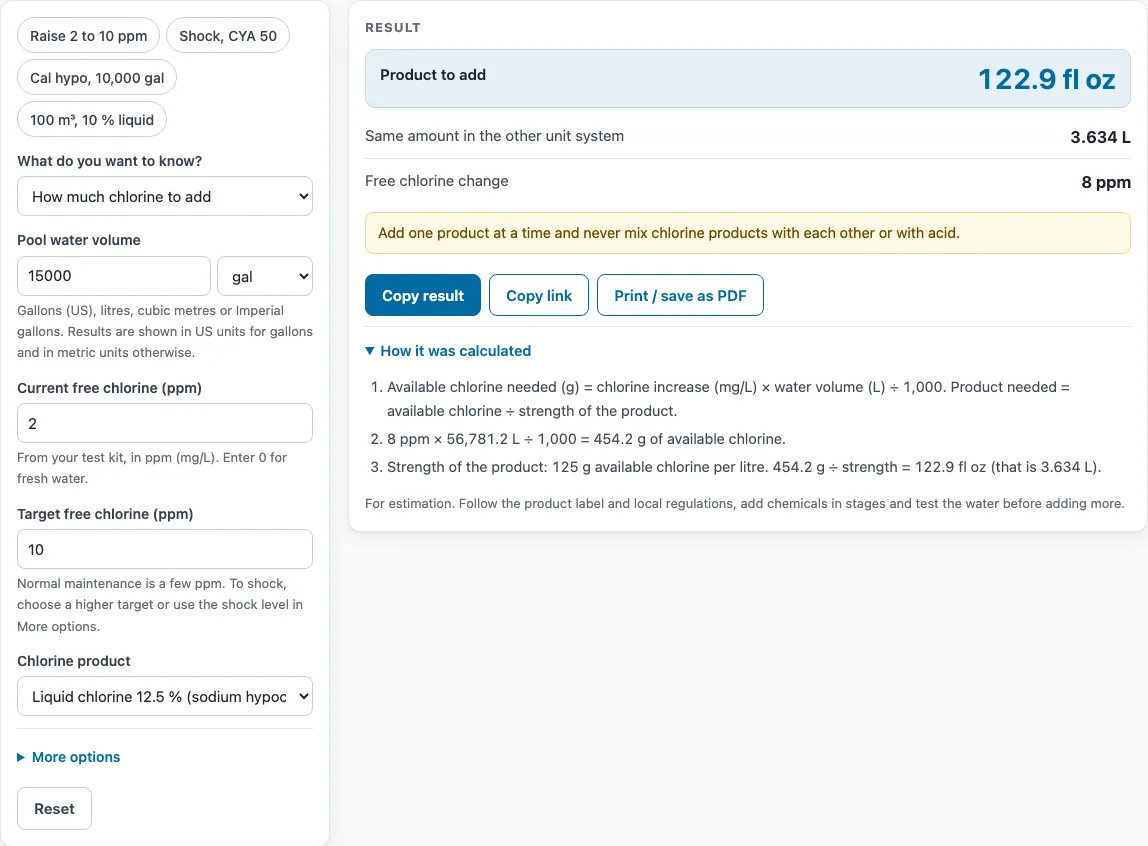
- Press a preset above the form if your case matches one, such as raising 2 to 10 ppm in 15,000 gal, shocking with CYA 50, or using calcium hypochlorite in 10,000 gal. Press Reset to return to the starting example.
- Enter the pool water volume and pick its unit from the unit menu: gal, L, m³ or Imperial gal. Each quantity has its own unit menu, so you can mix systems.
- Enter the current FC in ppm.
- Enter the target FC in ppm. If the current FC is already at or above the target, no product is calculated and a warning appears.
- Choose your product from the list, or choose custom and enter its percent and whether it is liquid or solid.
- Open More options to enter CYA. Tick the box to set the target to 40 % of CYA, a commonly used shock level.
- Read the dose. It shows the amount in US units when the volume is in gallons, or in metric units otherwise, plus the same amount in the other system.
- To check a dose you have already added, set What do you want to know? to What ppm an amount will give and enter the amount. Liquids need a volume unit and solids need a weight unit.
- Open “How it was calculated” to see the formula, the values substituted and the answer with units.
Copy link keeps every input in the page address, and Print / save as PDF gives a dated record.
How do I calculate pool chlorine dose?
To find the dose, work out how many grams of available chlorine the water needs, then divide by the strength of your product. Multiply the ppm increase by the water volume in litres and divide by 1,000 to get grams of available chlorine. Then divide that by the product’s strength, such as 125 g/L for 12.5 % liquid chlorine, or a fraction such as 0.65 for 65 % calcium hypochlorite.
Take 15,000 gal raised from 2 to 10 ppm with 12.5 % liquid. The volume is about 56,781 L and the increase is 8 ppm. So 8 × 56,781 ÷ 1,000 = 454.2 g of available chlorine. Dividing by 125 g/L gives 3.634 L, which is 122.9 fl oz (0.96 gal).
Solid products use the same steps. For 10,000 gal raised by 10 ppm with 65 % calcium hypochlorite, 378.5 g of available chlorine ÷ 0.65 gives 582.4 g. Bleach sold by weight is converted with typical densities of about 1.08 kg/L for 6 % and 1.11 kg/L for 8.25 %, giving about 64.8 and 91.6 g/L of available chlorine. Label values vary a little between makers, so check your label.
The reverse mode uses the same formula in the other direction. One gallon of 12.5 % liquid in 10,000 gal gives 473 g of available chlorine in 37,854 L, which raises FC by 12.5 ppm.
How do I calculate pool volume for an oval pool?
An oval pool’s volume is approximately π × half-length × half-width × average depth. The half-length and half-width are the semi-axes, so measure the full length and width and halve each one. Use the average depth if the floor slopes: add the shallow and deep depths and divide by two.
For a pool 24 ft long, 12 ft wide and 4 ft deep, the semi-axes are 12 ft and 6 ft. So 3.1416 × 12 × 6 × 4 = 904.8 ft³. Multiplying by 7.48 gal per ft³ gives about 6,770 US gal. Enter that figure with the gal unit selected, or let the pool volume calculator do the measuring for any pool shape.
Sources
Checked October 2026:
- CDC, Home pool and hot tub water treatment and testing: at least 1 ppm free chlorine in pools, at least 2 ppm when cyanuric acid is used, pH 7.0 to 7.8
- San Francisco Dept of Public Health, pool water chemistry: available chlorine of calcium hypochlorite (65 to 75 %), lithium hypochlorite (30 to 35 %) and liquid chlorine (12 to 16 %); trichlor and dichlor strengths are checked by molar mass and labels
- The 7.5 % minimum and 40 % shock ratios to cyanuric acid come from the Trouble Free Pool FC/CYA chart, a community guideline rather than a code
- Always follow the label of the product you use
For estimation; verify critical designs against the applicable standard.
Worked examples
| Input | Result |
|---|---|
| 15000 gal, 2 ppm to 10 ppm with Liquid chlorine 12.5 % (sodium hypochlorite) | Add 122.9 fl oz (3.634 L) |
| 10000 gal, 1 ppm to 11 ppm with Calcium hypochlorite 65 % (cal hypo) | Add 1.284 lb (582.4 g) |
| 10000 gal, 3 ppm to 20 ppm with Bleach 8.25 % (sodium hypochlorite) | Add 1.856 gal (7.027 L) |
| 100 m³, 0 ppm to 5 ppm with Liquid chlorine 10 % (sodium hypochlorite) | Add 5 L (1.321 gal) |
| 1 gal of Liquid chlorine 12.5 % (sodium hypochlorite) in 10000 gal | Raises free chlorine by 12.5 ppm, to 14.5 ppm |
Calculated by the tool above with these values.
Frequently asked questions
Can I use the results in commercial projects or client reports?
Yes. Results may be used in commercial work, including quotes, design notes, reports and client projects, without attribution. The note under the result reads: “For estimation. Follow the product label and local regulations, add chemicals in stages and test the water before adding more.”
Is the calculator free, and is anything I type uploaded?
The calculator is free and needs no account or sign-up. Everything is calculated in your browser, and nothing you type is uploaded.
Can I print or share a calculation?
Yes. Print / save as PDF produces a one-page record with the inputs, results, calculation steps and date. Copy link stores your inputs in the page address so the same calculation reopens later or can be sent to a colleague.
Why does the calculator show no product amount?
This happens when the current FC is already at or above the target. The calculator shows a warning instead of a dose.
Why does the calculator warn that my FC is below 7.5 % of CYA?
When you enter CYA, the calculator shows the minimum FC for that CYA at 7.5 %, a commonly used guideline rather than a standard. It warns when the current or target FC is below that level.
Related tools
- Chlorine Dosage Calculator: use it when you want a separate dosage check for chlorine.
- Pool Salt Calculator: use it when your pool uses salt for chlorine generation.
- Pool Volume Calculator: use it to find your pool’s water volume before dosing.
- Tank Size Calculator: use it to work out the volume of a tank, including a storage tank for chemicals.
- Aquarium Volume Calculator: use it to find the water volume of an aquarium.
- Langelier Saturation Index Calculator (LSI): use it to check whether your water is likely to scale or corrode.
- Rainwater Harvesting Calculator: use it to estimate how much rainwater a roof can collect.
- All water treatment calculators: use it to browse every calculator on the site.