Pool Chemical Calculator
Choose alkalinity, stabilizer, calcium or pH, enter the water volume and your readings, and get the amount of chemical to add.
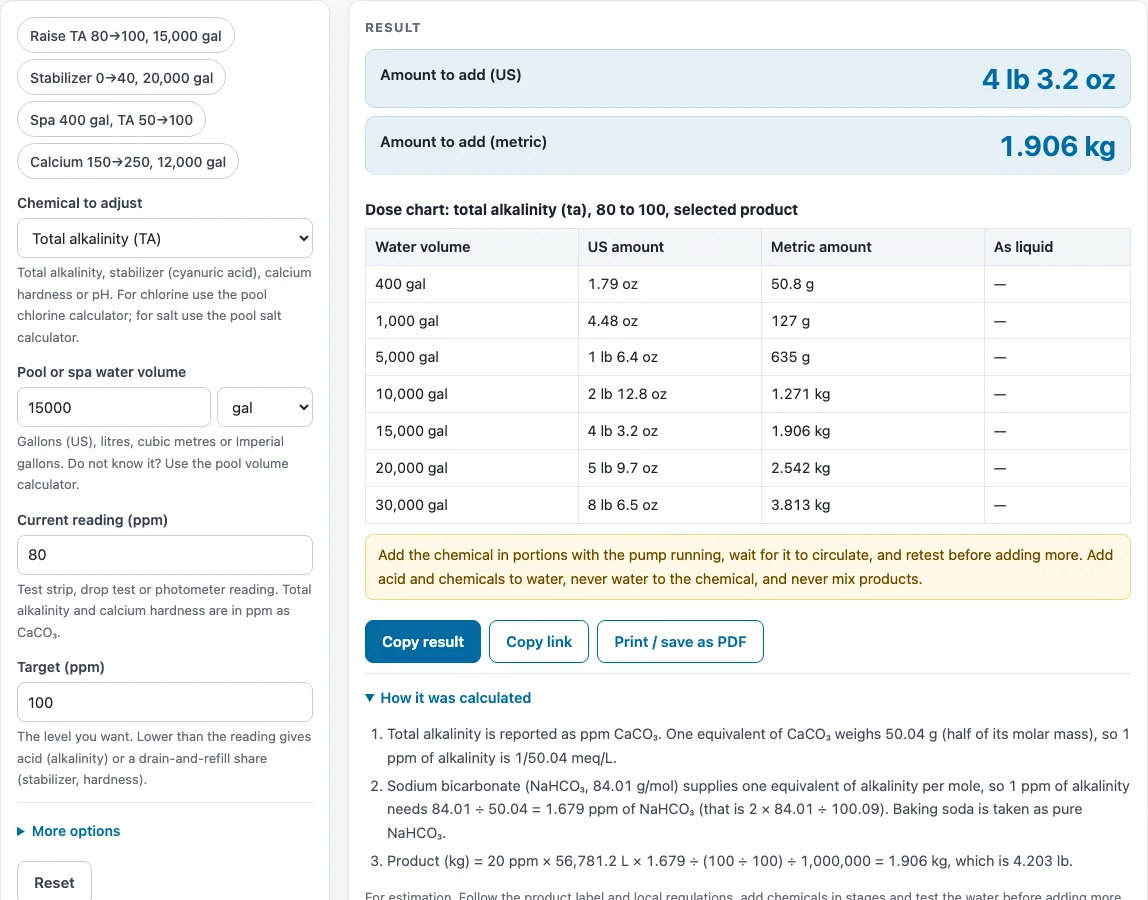
How to use the Pool chemical calculator
- Open the Chemical to adjust menu and choose total alkalinity, stabilizer (cyanuric acid), calcium hardness or pH. Only the fields for that job appear.
- Type your water volume and pick its unit: US gallons, litres, cubic metres or Imperial gallons. If you do not know the volume, use the link to the pool volume calculator under the field.
- For alkalinity, hardness or stabilizer, type the current reading and the target in ppm.
- For pH, type the dose from your product label, the water volume that label is for, and the pH change it gives.
- Pick your product, such as muriatic acid at 31.45 %, dry acid (sodium bisulfate) or calcium chloride as anhydrous pellets or 77 % flake, and check Product strength (%) against your label.
- Read the result in both US and metric units. Open How it was calculated to see the formula, the values used and the answer. Read any warnings that appear.
- Add the chemical in stages, with the pump running, then retest.
Under the result, Copy result copies the result lines with a link, and Copy link copies the page address, which stores every input so you can reopen the same calculation later. Print / save as PDF creates a one-page record with the inputs, results, steps and date. More options holds the less common inputs, Reset restores the starting example, and the preset buttons above the form load typical cases.
How much baking soda do I need to raise alkalinity?
Sodium bicarbonate (baking soda, NaHCO₃) raises total alkalinity. Each 1 ppm of alkalinity needs 1.679 ppm of NaHCO₃, from 2 × 84.01 ÷ 100.09, using molar masses based on IUPAC atomic weights. Alkalinity is measured as ppm CaCO₃, so the factor converts your rise into a product dose.
For a 20 ppm rise, the dose is 20 × 1.679 = 33.58 ppm of NaHCO₃. Because 1 ppm equals 1 mg per litre, the mass in grams equals that ppm value multiplied by the litres of water, divided by 1,000. This is why the water volume must be right. The calculator then converts grams into pounds, ounces, kilograms or grams.
Lowering alkalinity uses acid instead. Pure hydrochloric acid needs 36.46 ÷ 50.04 = 0.7285 ppm for each 1 ppm of alkalinity removed. Pure sodium bisulfate needs 120.06 ÷ 50.04 = 2.399 ppm. The calculator then divides by product strength. For 31.45 % muriatic acid, 0.7285 ÷ 0.3145 ≈ 2.32 ppm of product is needed per 1 ppm reduction. Liquid doses are also given in millilitres and fluid ounces, using a specific gravity of 1.16 for 31.45 % acid.
Calcium hardness works the same way with calcium chloride. Each 1 ppm of hardness as CaCO₃ needs 110.98 ÷ 100.09 = 1.109 ppm of pure CaCl₂. The product strength field corrects for pellets or flake that are less pure.
Why does lowering stabilizer mean draining water?
Chemicals cannot remove cyanuric acid or calcium from water, so the only way to lower them is dilution. The calculator gives the share of water to drain and refill as 1 − target ÷ current. For a change from 120 ppm to 60 ppm, 1 − 60 ÷ 120 = 0.5, so the answer is to drain and replace 50 %. On 50,000 litres, that is 25,000 litres.
For calcium hardness, the refill water usually has its own hardness. The formula then becomes (current − target) ÷ (current − fill). Enter the hardness of your fill water, because a wrong value gives a wrong share. Adding stabilizer works differently: each 1 ppm added gives 1 ppm of cyanuric acid, adjusted by the product strength field, which is 100 % by default.
Sources
Checked October 2026:
- Molar masses from IUPAC CIAAW standard atomic weights: NaHCO₃ 84.01, CaCO₃ 100.09, HCl 36.46, NaHSO₄ 120.06, CaCl₂ 110.98
- Muriatic acid 31.45 % HCl, specific gravity 1.16: OxyChem Hydrochloric Acid Handbook
- Dry acid 93.2 % sodium bisulfate: product safety data sheet; calcium chloride pellets 94–97 %: OxyChem; 77 % flake: Florida Department of Health pool technician manual
- Warning ranges (pH 7.2–7.8, alkalinity 60–180, calcium hardness, cyanuric acid limits): CDC Model Aquatic Health Code annex, Florida Administrative Code 64E-9 as quoted in the Florida manual, and CDC home pool and hot tub guidance
For estimation. Follow the product label and local regulations, add chemicals in stages and test the water before adding more.
Worked examples
| Input | Result |
|---|---|
| Total alkalinity (TA), 15000 gal, from 80 to 100 ppm | Add 4 lb 3.2 oz (1.906 kg) |
| Stabilizer (cyanuric acid), 20000 gal, from 0 to 40 ppm | Add 6 lb 10.8 oz (3.028 kg) |
| Total alkalinity (TA), 400 gal, from 50 to 100 ppm | Add 4.48 oz (127 g) |
| Total alkalinity (TA), 20000 gal, from 140 to 100 ppm | Add 15 lb 7.4 oz (7.015 kg), 204.5 fl oz (6.39 qt) as liquid |
| Calcium hardness, 12000 gal, from 150 to 250 ppm | Add 11 lb 10 oz (5.274 kg) |
| Stabilizer (cyanuric acid), 50000 L, from 120 to 60 ppm | Drain and replace 50 % (25,000 L) |
Calculated by the tool above with these values.
Frequently asked questions
Can I use the results in commercial projects or client reports?
Yes. Results may be used in commercial work, including quotes, service reports and client projects, without attribution. Under each result, the page says the figures are for estimation: follow the product label and local regulations, add chemicals in stages and test the water before adding more.
Is the calculator free, and is anything I type uploaded?
The calculator is free, and there is no account or sign-up. Everything is calculated in your browser, and nothing you type is uploaded.
Can I print or share a calculation?
Yes. Print / save as PDF creates a one-page record with your inputs, results, calculation steps and the date. Copy link copies a page address that stores every input, so the same calculation opens later or can be sent to a colleague.
Can I use this calculator for a hot tub or spa?
Yes, and the calculator has a spa example of a 400-gallon spa raising alkalinity from 50 to 100 ppm. For stabilizer jobs, the warnings include the CDC advice against cyanuric acid in hot tubs, so read that note before you dose.
Why does the pH dose only give an estimate?
How far a dose moves pH depends on the water’s alkalinity and other factors, and we found no published formula we could cite, so the calculator scales the label dose instead. Set alkalinity first, then adjust pH. Use the dose and pH change printed on your own product, and test again after each addition.
Related tools
- Pool chlorine calculator: use it when you need to work out chlorine doses for your pool.
- Pool salt calculator: use it when you need to find how much salt to add to a salt chlorine pool.
- Pool volume calculator: use it when you do not know your water volume and need it before dosing.
- Langelier saturation index calculator: use it when you want to check whether your water is likely to be corrosive or scale-forming.
- Water hardness chart: use it when you need to convert between hardness units or compare readings.
- All water treatment calculators: use it when you want to browse every calculator on the site.