Langelier Saturation Index Calculator (LSI)
Enter pH, temperature, calcium hardness, alkalinity and TDS to see whether the water tends to form scale or to be corrosive.
The Langelier Saturation Index Calculator gives the LSI of water, a number that shows whether water tends to leave scale on surfaces or to corrode metal. Enter pH, temperature, calcium hardness, total alkalinity and total dissolved solids (TDS), and it returns the LSI, the Ryznar Stability Index (RSI) and the saturation pH (pHs). It runs in your browser, is free, and needs no sign-up.
Pool owners can use the pool mode as a pool saturation index calculator, which also takes cyanuric acid (CYA) into account, so it works as an LSI calculator for pools (lsi calculator pool) as well as for tap, cooling and boiler water. Preset buttons load typical cases, and the result updates as you type, so you can see how one change affects the water balance.
How to use the Langelier Saturation Index Calculator
- Choose the water type: swimming pool or spa, or other water.
- Enter the pH. The field accepts values from 4 to 12.
- Enter the water temperature and pick °F or °C from its unit menu.
- Enter the calcium hardness in ppm as CaCO₃.
- Enter the total alkalinity in ppm as CaCO₃.
- In pool mode, enter the cyanuric acid (CYA) level.
- Open More options and enter the TDS. If you leave it empty, the calculator assumes 1,000 ppm for a pool and 500 ppm for other water, and shows a warning for pools. Salt pools have much higher TDS, so enter the real value.
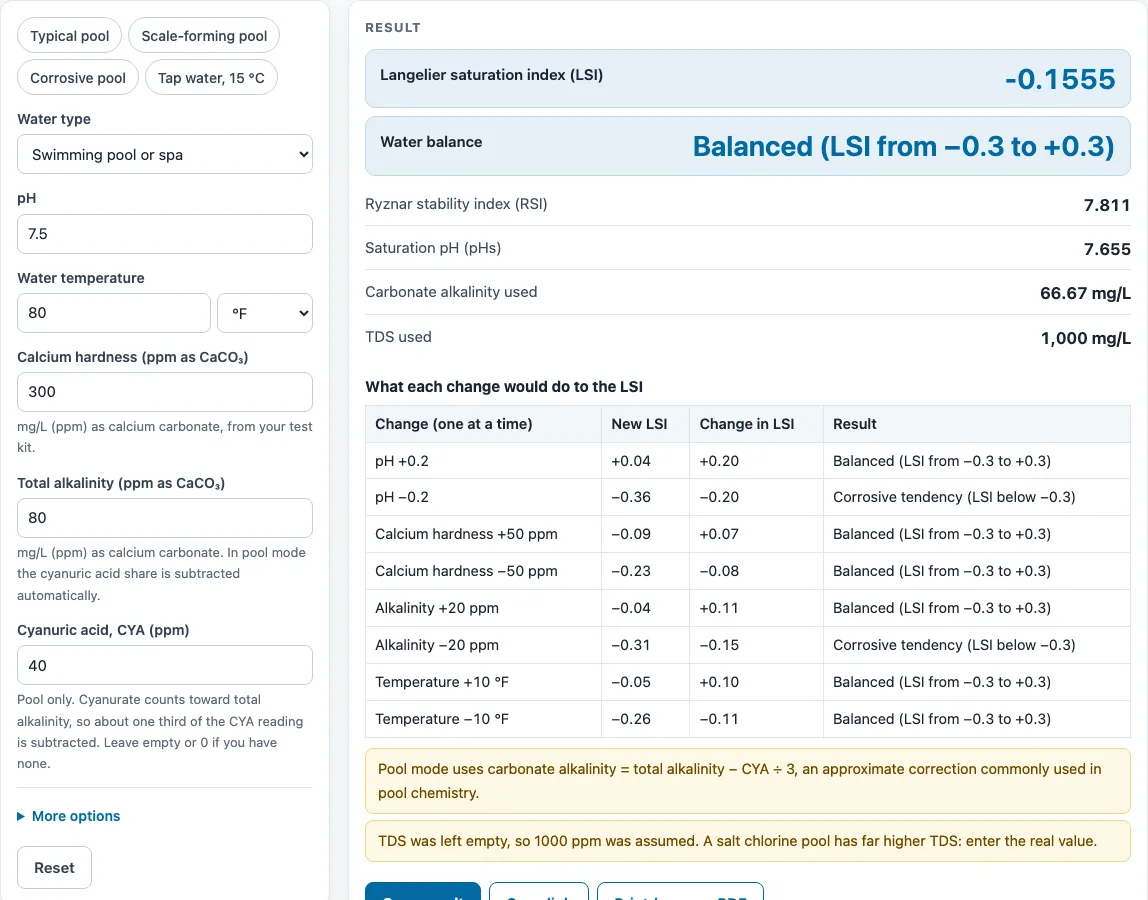
- Read the result: the LSI, the water-balance band, the RSI, the saturation pH, the carbonate alkalinity used (pool mode) and the TDS used.
- Check the sensitivity table to see what a single change to pH, calcium hardness, alkalinity or temperature would do to the LSI.
- Open How it was calculated to see the formula, the values substituted and the answer with units.
Preset buttons load a typical, a scale-forming and a corrosive pool, plus tap water. Copy link keeps every input in the page address, and Print / save as PDF gives a dated record.
How do you calculate saturation index?
The Langelier Saturation Index is LSI = pH − pHs, where pH is the measured pH and pHs is the pH at which the water would be in balance with calcium carbonate. The calculator finds pHs from temperature, calcium hardness, alkalinity and TDS.
The calculator uses the published Langelier (1936) approximation, as given in the Carrier Handbook of Air Conditioning System Design: pHs = (9.3 + A + B) − (C + D). The terms are A = (log₁₀ TDS − 1) ÷ 10, B = −13.12 × log₁₀(T in °C + 273) + 34.55, C = log₁₀(calcium hardness as CaCO₃) − 0.4 and D = log₁₀(alkalinity as CaCO₃). Each input enters through one of these terms, so a change to any input shifts the LSI.
What do the LSI bands mean?
An LSI below −0.3 is read as a corrosive tendency, from −0.3 to +0.3 as balanced, and above +0.3 as scale-forming. These bands are commonly used, but they are not a standard, so treat them as a guide rather than a pass or fail line.
What is the Ryznar Stability Index?
The Ryznar Stability Index is RSI = 2 × pHs − pH. It uses the same saturation pH as the LSI, so the two numbers come from one set of inputs. Read the RSI alongside the LSI, since the two describe the same water in different ways.
Why does pool mode use carbonate alkalinity?
In pool mode the alkalinity used in the formula is carbonate alkalinity = total alkalinity − CYA ÷ 3. This is an approximate correction commonly used in pool chemistry, because CYA also contributes to the alkalinity reading. If the result is zero or negative, the calculator shows an error.
How do the worked examples compare?
A pool at pH 7.5, 80 °F, calcium 300 ppm, alkalinity 80 ppm, CYA 40 ppm and default TDS gives an LSI of −0.155 and an RSI of 7.81, which is balanced. A pool at pH 7.8, 84 °F, calcium 400 ppm, alkalinity 120 ppm, CYA 30 ppm and TDS 2,000 ppm gives an LSI of +0.499, which is scale-forming. Tap water at pH 7.5, 15 °C, calcium 100 ppm, alkalinity 100 ppm and TDS 500 ppm gives an LSI of −0.653, which is corrosive. The same water at 40 °C, with pH 7.8, calcium 400 ppm, alkalinity 120 ppm and TDS 2,000 ppm, gives an LSI of +0.743.
Sources
Checked October 2026:
- Langelier, W. F. (1936), The analytical control of anti-corrosion water treatment, J. AWWA 28(10)
- The pHs approximation pHs = (9.3 + A + B) − (C + D) with A, B, C and D as shown in the steps is the form published in the Carrier Handbook and widely reproduced (see Wikipedia, Langelier saturation index)
- Ryznar stability index RSI = 2 pHs − pH (Ryznar 1944); the ±0.3 bands are common practice, not a standard; carbonate alkalinity = total alkalinity − CYA ÷ 3 is the usual pool correction
For estimation; verify critical designs against the applicable standard.
Worked examples
| Input | Result |
|---|---|
| pH 7.5, 80 °F, calcium 300 ppm, alkalinity 80 ppm | LSI -0.155, RSI 7.81: Balanced (LSI from −0.3 to +0.3) |
| pH 7.8, 84 °F, calcium 400 ppm, alkalinity 120 ppm | LSI 0.499, RSI 6.8: Scale-forming tendency (LSI above +0.3) |
| pH 7.2, 28 °C, calcium 150 ppm, alkalinity 60 ppm | LSI -0.777, RSI 8.75: Corrosive tendency (LSI below −0.3) |
| pH 7.5, 15 °C, calcium 100 ppm, alkalinity 100 ppm | LSI -0.653, RSI 8.81: Corrosive tendency (LSI below −0.3) |
| pH 7.8, 40 °C, calcium 400 ppm, alkalinity 120 ppm | LSI 0.743, RSI 6.31: Scale-forming tendency (LSI above +0.3) |
Calculated by the tool above with these values.
Frequently asked questions
Can I use the results in commercial projects or client reports?
Yes. Results may be used in commercial work, such as quotes, design notes, reports and client projects, without attribution. Treat them as estimates and confirm water balance with a test after any change.
Is the calculator free, and is anything I type uploaded?
Yes, the calculator is free. Everything is calculated in your browser, nothing you type is uploaded, and there is no account or sign-up.
Can I print or share a calculation?
Yes. Print / save as PDF produces a one-page record with the inputs, results, calculation steps and date. Copy link stores all inputs in the URL, so the same calculation reopens later or can be sent to a colleague.
What does the sensitivity table show?
The table shows the new LSI, the change and the band for one change at a time: pH ±0.2, calcium hardness ±50 ppm, alkalinity ±20 ppm, and temperature ±10 °F (±5 °C). It helps you see which input moves the balance most before you add any chemical.
Why does a warning appear when TDS is left empty?
Without a TDS value the calculator assumes 1,000 ppm for a pool, which suits most chlorine pools. Salt pools run far higher, often around 3,000 ppm or more, so enter your measured TDS for a better LSI.
Related tools
- Tank Size Calculator — use it to work out the volume of a tank before you judge the water in it.
- Aquarium Volume Calculator — use it to find the water volume of an aquarium for dosing or water-change planning.
- Chlorine Dosage Calculator — use it to estimate how much chlorine a volume of water needs.
- Pool Chlorine Calculator — use it to plan chlorine levels for a swimming pool.
- Pool Salt Calculator — use it to estimate salt needed for a salt chlorine pool, which affects the TDS you enter here.
- Pool Volume Calculator — use it to find pool volume for dosing and balance calculations.
- Rainwater Harvesting Calculator — use it to estimate how much water a roof can collect.
- All water treatment calculators — use it to browse every calculator on the site.